
About
Most popular Minecraft hack to date. Open source and packed with features. Works for Windows, Linux and MacOS. Works online on multiplayer servers. When using hacked clients on servers, you risk getting banned.
Wurst Minecraft hack is free to download.
Media – Screenshots
Screenshots of Wurst (click)
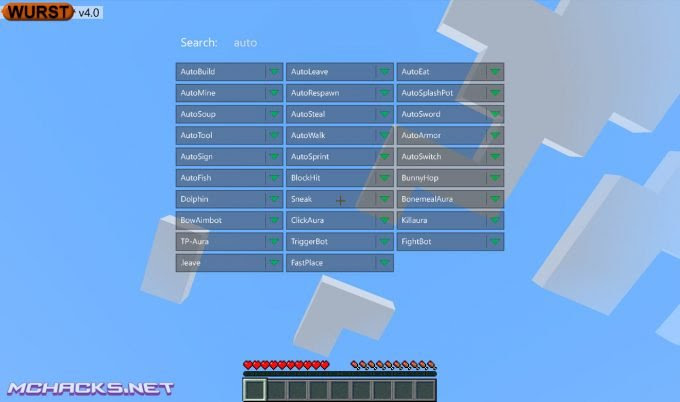


Features – Mods – Cheats
Example of mods/features included.
Wurst features (click)Mods
- AntiAFK
- AntiBlind
- AntiCactus
- AntiFire
- AntiKnockback
- AntiMAC
- AntiPotion
- AntiSpam
- ArenaBrawl
- AutoArmor
- AutoBuild
- AutoEat
- AutoFish
- AutoLeave
- AutoMine
- AutoRespawn
- AutoSign
- AutoSoup Mod
- AutoSplashPot Mod
- AutoSprint
- AutoSteal
- AutoSwitch
- AutoSword
- AutoTool
- AutoWalk
- BaseFinder
- Blink
- BlockHit
- BoatFly
- BonemealAura
- BowAimbot
- BuildRandom
- BunnyHop
- CMD-Block
- CaveFinder
- ChestESP
- ClickAura
- CrashChest
- CrashItem
- Criticals
- Derp
- Dolphin
- ExtraElytra
- FancyChat
- FastBow
- FastBreak
- FastEat
- FastLadder
- FastPlace
- FightBot
- Flight Mod (with Bypass)
- Follow
- ForcePush
- ForceOP (AuthMe Cracker)
- Freecam
- Fullbright
- GhostHand
- Glide
- HeadRoll
- Headless
- HealthTags
- HighJump
- InstantBunker
- Invisibility
- ItemESP
- Jesus
- Jetpack
- Kaboom
- Killaura
- KillauraLegit
- KillerPotion
- LSD
- Liquids Mod
- LogSpammer
- MassTPA
- MenuWalk
- MileyCyrus
- MobESP
- MultiAura
- NameProtect
- NameTags
- Navigator
- NoClip
- NoFall
- NoHurtcam
- NoSlowdown
- NoWeb
- Nuker Mod
- NukerLegit
- OP-Sign Mod (Force OP)
- Overlay
- Panic
- Phase
- PlayerESP
- PlayerFinder
- PotionSaver
- ProphuntESP
- Protect
- Regen Mod (God Mode)
- RemoteView
- SafeWalk
- Search
- SkinBlinker
- Sneak
- Spammer
- SpeedHack
- SpeedNuker
- Spider
- Step
- TP-Aura
- Throw
- Timer
- Tired
- Tracers
- Trajectories
- TriggerBot
- TrollPotion
- TrueSight
- Tunneller
- X-Ray
- /home
Special Features
- Alt Manager
- BookHack (Force OP)
- Session Stealer (Force OP)
- Server Finder
- Target
- YesCheat+
How to use Wurst (controls)
- Click GUI/menu: Left CTRL
- FastPlace: F
- Flight: G
- Freecam: U
- Fullbright: C
- /home: H
- Killaura: R
- Nuker: L
- Sneak: Z
- Xray: X
List of commands
Commands (click)- .addalt
- .annoy
- .author
- .binds
- .blink
- .clear
- .copyitem
- .damage
- .drop
- .enchant
- .fastbreak
- .features
- .follow
- .friends
- .getpos
- .ghosthand
- .give
- .gm
- .goto
- .help
- .invsee
- .ip
- .jump
- .leave
- .modify
- .nothing
- .nuker
- .path
- .potion
- .protect
- .rename
- .repair
- .rv
- .say
- .search
- .setcheckbox
- .setmode
- .setslider
- .spammer
- .sv
- .t
- .taco
- .throw
- .tp
- .vclip
- .wms
- .xray
Minecraft versions
Currently available for:
- Minecraft 1.10.x
- Minecraft 1.9.x
- Minecraft 1.8.x
- Minecraft 1.7.x
How to install Wurst Client
How to install the client (click)Windows Installation
- Download and extract the zip file.
- Close Minecraft (if open).
- Navigate to:
%appdata%\.minecraft\versions - Move the extracted Wurst folder to:
\versions - Open the Minecraft launcher.
- Click on “New Profile”.
- Settings:
- Profile Name: Wurst
- Use version: release Wurst
- Save Profile.
- Choose the newly created profile “Wurst” and click “Play”.
Mac installation
- Download and extract the zip file.
- Close Minecraft (if open).
- Navigate to:
~Library/ApplicationSupport/minecraft/versions - Move the extracted Wurst folder to:
/versions - Open the Minecraft launcher.
- Click on “New Profile”.
- Settings:
- Profile Name: Wurst
- Use version: release Wurst
- Save Profile.
- Chose the newly created profile “Wurst” and click “Play”.
Linux Installation
- Download and extract the zip file.
- Close Minecraft (if open).
- Navigate to:
\Home\.minecraft\versions - Move the extracted Wurst folder to:
\versions - Open the Minecraft launcher.
- Click on “New Profile”.
- Settings:
- Profile Name: Wurst
- Use version: release Wurst
- Save Profile.
- Chose the newly created profile “Wurst” and click “Play”.
Download links below.
The post Wurst Client appeared first on MCHACKS.net.
Ver publicacion completa // See full post --> >>MCHACKS.net<<
Thx mchacks
PostDate: July 16, 2016 at 03:09PM

0 comentarios:
Publicar un comentario